Ok. So this is a nice little refreshing tip I had kind of forgotten about...but its a charm. In your tracks sometimes, you will be using a sound that repeats. "NO WAY Mr. DANCE PRODUCER" you say? Yea Yea, but, repetitive music doesnt have to be dull. Sometimes, especially percussion elements like blocks, cow bells, bongos, djembes, congas, etc...need to have small variations in them so they sound less computer like. I come from a background of organic instruments, and later found electronic music. So, when I think about a natural instrument being put into a track, I like to decide if I want that sound to actually sound REAL, or sound unnatural. When real is the case, then I like to think about all the factors that go into making that instruments unique sound.
I host full moon drum circles in Osaka here every month under Osaka Castle (rad place by the way). So, I get a chance to think about sound dynamics at least once a month with a bunch of other musicians, and different people each time.
Lets take a djembe so to say. What sounds go into making it different, and how are we going to do that in ableton live.
1. Drummers Strength - This is how hard the drummer is hitting the drum. Easily changed with velocity or volume envelopes.
2. How far away is the drummer? - That is changed with the master volume of the track or tracks.
3. What is the ambiance of that place they are drumming? - Reverbs, volume, even delays can create this.
4. How funky is he? - This is controlled by moving the drums notes forward and backward in time, or applying a groove from the groove pool.
5. Is the drummer letting the drum ring out, or sustaining it with his hand? - This is easily changed by just changing the volume envelope and making it with only an attack...or just shorten the sample.
 6. What is the pitch of the drum? Now this is the hard one, and what I want to talk about today.
This is the core fundamental of this idea of changing the pitch of anything with LFOs, so the loop will not sound as boring. For illustration purposes only, I am showing how to do this with a hand drum....but, it can be applied to ALMOST anything, and is especially good for organic rhythmic elements, or really repetitive sounding parts that might annoy you in a mix.
Back to the hand drum now, for those of you who dont know a lot about drums....they actually have TONS of great tones. By moving your hand around the top, around the outside, catching a little bit of wood in the hit, catching a little bit of the hide around the outside, cupping your hands, rolling your fingers, sustaining it all the while....trust me...there are TONS of tones on a hand drum. As a matter of fact, the science of it tells you, that unless the drummer hits in EXACTLY the same place every time...the pitch should be a little different each time...and hand drummers are usually rocking it out hard, and feelin' that groove...and from my experience...hand drummers like to trance out when jamming. So I doubt that their brains are saying "lets make sure I hit in the same place every time." So we need to be able to create that almost RANDOM changing of pitch...but not so drastic as to obviously change the pitch by a semi tone (unless that is the desired effect). This concept can be taken to the extreme and turned into some super fucking awesome effects, but today we are going to talk about how to do it VERY subtly, and turn our boring, stagnant loops into dynamic, realistic, loops.
So, what I am going to do is take a simple bongo loop for now. Usually I would make one using one hits, but for the purpose of this tutorial, its just a background sound for me to add some dynamics to. Since it is an ACTUAL HAND DRUM recording, and not super short, it has real pitch sounds changing in it already. What I want to do is add a few extra attack drum taps to liven it up a little, and really make it sound less repetitive. You could do this to ALL of the loops sounds if you wanted to...and you created them all by hand, but sometimes....its good to have a backbone, and then add a few changing sounds into it. Either way can sound good.
So 1 audio track with a bongo loop, 1 midi track with a simpler and a conga one shot hit -
Mine are in yellow -

As you can see, I am only using the attack sound of the conga hit because I just want to add a few of those drum hits where the drummer mutes the sound of the drum after they hit it. More of a high pitched THWACK!
Now I am going to play my bongo loop and record a few extra drum hits. I am also going to move the midi notes around a little bit until I get something I like -
 This is what I came up with. I had to shut the grid off to get them just right. Just a couple extra drum hits. I also tuned it so its in the same pitch as the other drum loop.
 So, now we have a couple nice sounding attacky drum hits to add some dynamics to this repetitive sound. Now, please keep in mind, this is just a basic example. If you were to really take care of your drum loop, and use all one hits, separating them on a couple different tracks, and then use the following method...you can get beautiful changing sounds, or you could get a total sloppy mess. That is why I am showing you this in more of a TOOL fashion, because in this explanation, we are using it SO subtly, that, if applied right, should almost be unable to be noticed when listening to the WHOLE track.
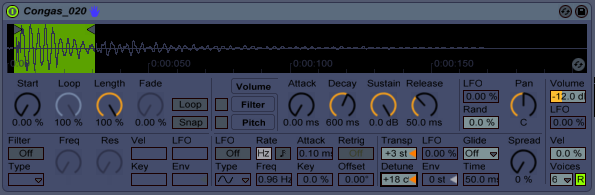
First thing we are going to want to do is turn on the LFO in the middle of the simpler -
 Also make sure RETRIG is OFF because we dont want it to re-trigger the LFO every time or that would then become a predictable change and would still make the drum hits repetitive.
Now, what we want to do, is use the pitch LFO (beside the transp) and change the rate (freq) a little bit to get a subtle changing of pitch.
For the purpose of understanding what is going on here, put the LFO up quite a bit and just start tapping your simpler (with midi controller or keyboard) and watch the pitch go up and down.
 What we want to do is do that SO subtly, that it is working within the detune range of the sound, and just making it sound less boring.
I ended up coming up with these very SMALL parameters for my rate (freq) and LFO -
 Now, if this was done correctly, you should almost be UNABLE to notice the difference. But, over time...this can amount to a lot. Especially if you apply it to other corresponding rhythms. Sometimes, it may be nice to have one of the more dominant rhythm parts, something sitting in the lower frequencies...to be unchanged at all. So it holds everything together, and then use this method on the other smaller, less bassy percussion. This is just MY idea, and from my experience, how I like it to work. You can however apply pitch LFOs to everything, and if you mastered this idea...using multiple tracks to make your rhythmic percussion, you could in theory, recreate the unpredictable, yet kind of predictable sounds of any organic percussion instrument.
Also, keep in mind, if you apply this technique (or any pitch LFO technique) to other sounds like synth stabs, pads, tech house bass etc etc etc, you get some fabulous results. Again, this was an example of thinking long term with your rhythm, but go wild with your pitch envelopes & LFOs. They can be really surprising.
Hope this helped! Keep makin tunes!!!
FroBot