Sunday, June 20, 2010
Best Books About Ableton Live
Peace!
FroBot
Wednesday, June 16, 2010
How To Write Electronic Music

Original Article - http://analogik.com/article_writing_electronic_music.asp
What does it take to make a fine piece of electronic music?
How many times have you had that special inspirational moment and thought that that was it – you were going to write a piece that will leave its mark in the whole genre? If the answer is ‘never' then perhaps, you should stop reading this article and start doing something else, as it probably will not make the right kind of connection with you.
For all of you out there, who are going to keep trying, read on. This will be so obviously familiar that it might actually surprise you that you will find it helpful with stimulating and reassuring your inner cacophony of impulses about what is right, and what is wrong.
Firstly, let us clarify two things. If you are going to be an electronic music genius, keep in mind the two most likely scenarios. In both, the world of arts and the world of science, there are two types of geniuses. First one is like getting lucky with lottery numbers, which means that you might hit the spot quite randomly and produce something special without much structure or planning. Second scenario though, is not so Hollywood-movie-like sounding, however it is much more likely as it puts you in control over your faith.
So what is it then? Well, this model consists of hard and persistent work with appropriate education or acquisition of knowledge that makes you fit for handling a vast variety of variables that make the special kind of music. Do not get discouraged by the fact that most of the famous artists and scientists have dedicated their entire lives to, often, one line of research or style. Remember that we are talking about electronic music here and should not detach ourselves too much from the scientific, as this is one music style that unites science, futurism and art, and that is what makes it so special and beautiful.
So what do you have to do?
- Life is busy, so you have to make time for your music or give up right now.
- Be innovative, but research as lot. Knowledge is a good catalyst for inspiration.
- Organize your files and samples, keep history of your progress and track versions.
- Do not give up. Take a break and compose when you compose yourself first.
- Mistakes should not discourage you if you simply try to avoid repeating them.
- Others might not always understand. If you are sure it is good, then it is good.
- Do not slave to equipment and software; it is an idea that you are hunting.
None music way #1
Before you even start to make any music, make sure that the Internet is turned off. If it is a computer that everyone uses, make yourself a new user account without internet connection - this was my problem, so I turned off the Internet and saved myself 4 hours per day (surfing adds up)! If everyone is using that one computer, make sure that you have a secure section on it (passworded- so you can back up your section) as you can bet alot of money on something getting deleted. Even have a rota as who can have the computer at what times. You don't want to be interrupted in mid-fantastic-never-been-heard-before-number-one-hook making.
None music way #2
Do a mini spring clean and make things user friendly. I have a Temp Store, Downloaded Folder, VST folder (subfoldered into beats, FX etc). This makes my computer work well, quickly and makes my time in music making more efficient. If your computer is not efficient, or you have to have time to find a piece of software that holds the secret to your humming tune, then you will forget that hum before you find the folder. Having things at hand is a practical way of music making. I know of top artists that go around with a tape recorder or writing pad all the time just in case they get "inspiration". The 2006 UK Football World Cup Song came to the artist in the bath.
None music way #3
How about invest in another monitor? This may seem odd, as we all have been brought up with the idea of one monitor leads to one computer. However, leading computer music artists are leading the way in utilizing 2 monitors at once. In one monitor you have your sequencer running, in the other monitor you could have your software instruments, or mixing deck or any combination that you want. Making music this way is much easier than having to minimize, maximize all the time- you need the computer music making phase to be as realistic as possible, rather than stop starting every few minutes to maximize a window.
None music way #4
Make sure that you are using what you should be using and that you know how to use it. A hotkey function sometimes is much quicker than if you use the mouse, but if you do not know how to use them properly your work can be deleted within a key stroke. Knowing your software, and how to use it properly will save you a heap of precious time, and will also show you functions that you never thought that you had. I have read somewhere that there are secret functions within the Ableton software that you will only find by experimenting. Take time out once every 6-12 months and read up on your software. Keep it refreshed within your head, don't assume that you know it. Make yourself a practice screen and just mess around, nothing is going to get wiped out. By experimenting you will find some great sounds and work much quicker.
None music way #5
If you have something that sounds very good...save it. I shall repeat...save it! Unfortunately there are many bits of software out there that do not have a "undo" button, so getting back that classic sound is impossible. Repeating the process will give you a sound that sounded 90% close to your long lost original. I tend to store good sounds into a folder called "experimentation", and thats where it stays. If I play the same sound after a day or two later and it doesn't sound the same, then I tweak the sound. In the past I used to write down all the values on how I built up particular sounds. I would even have a "sound day" where I would just make sounds of various types, and this kept me away from tinkering at music making time.
Before you make any type of music, stand back and just think, have you actually done all your none music making tasks?
The One Thing That Can Set You Out From the Rest to Make Better Techno!
Listen. This is vitally important. If you do not listen then your track will be very poor indeed . Listening is what most musicians have forgot to do and that is why we do not hear from them again. They have lost their roots, what ultimately made them famous. Trying to move away from your group roots is very risky. The Prodigy made fantastic rave and deep techno, then starting to go into a rock phase. It didn't work out too well, now they are trying to get back into their old territory but its hard. Their fan-base has shrunk as new groups have come up. The Prodigy are now releasing their classic hits to try and re-energize themselves to grab back their old fans, telling them "remember this, you liked it and now we are going to do the same".
Alot of money spent, alot of marketing time used. With example 2, Elton John has constantly chirped out piano tunes for along time now, always variation on the same theme and he is still lasting the time.
Listening to your audience , your dedicated audience (that will buy from you regularly) is the life-line to your selling. Go off-track and some will not like it but then again you might attract some new customers. For me, I would stick to what you know , you are good at it so why change? Sure re-invent yourself or adapt to the ever changing music market , but never change style. Case in point. Kyle, pop queen and the lady who brought us the Locomotion and I should Be So Lucky. But instead of keeping with cheesy pop she has slowly re-invented herself- pinnacling at Can't Get Your Out Of My Head. Same pop, but with 21st Century twist.
Listening also means you should listen to other tracks , go to concerts, clubs, wherever they play your music. DJs are always, and have to be, up-to-date with "whats hot and whats not". They listen to their audience, and they know sure well that if they get it wrong they either won't work again or they will get booed at!
Listen to other peoples comments . I had a real hard time listening to other people rip my music apart but I realised it was for the best. You must make sure that the people who listen to your music is your audience. If you do Drum and Bass and give a track to your grandparents to hear they might not like it. Playing a track to your friends of similar style liking, or a group of people is much better. A group increases the reliability of your "little study into your tracks" , more people increases the reliability and gives you a better opinion of how your tracks will be accepted. If one person says "ohh I didnt like that sample" keep it in mind, but if alot of people say the same, change the sample. It is a rare opportunity to see how your audience will react to your tracks, in the real world your sales would reduce, and you would just scratch your head wondering why.
Listen to the best in the genre . If you want to know what excellent and top techno tracks sound like ask your target audience who their top artists are, sometimes you might get inspiration from artists that you haven't heard from before, then surround yourself with the tracks. Listen to the tracks and bathe in their coolness.
Listening can sometimes mean not to listen . Sounds strange I know. But if you have been listening to your tracks day in day out, then listen to other peoples tracks, you can get a bit bored, tired, and to a point the tracks get samey. Have a day out in the week for a no music day . When you come back to your work you will be refreshed, your ears will be willing to take a pounding and you will listen to your music differently, tagging pieces that don't fit, sounding strange or having a better idea to implement.
Listen to the worst music . Now this isn't an exercise of laughing at poor techno, but it is to train you to what is poor and what is good . For an example, if I sat in any Ferarri I would think it is pretty cool, but top motor journalists would always give a downside, will always compare it to something else. Why? Because they have sat in poor cars and they have sat in the best, now they have a scale to use to judge any car. This is what you need to do. How do you know a good song is a good song? Subliminally you cross-reference it with something poor. But instead of doing it in the back of your mind, dig out the poor songs and (unfortunately) listen to them. Another example. I have seen on some websites they give away cassettes of their work. I know that this is poor practice because I have seen MP3s being offered for download (quicker, free and better quality).
Listen to other styles . This may be triggering the "what is he talking about" response, but hold with me. On my site I have demonstrated a fundamental fact through alot of top techno acts. They all have elements of different styles intertwined within their own . For example, The Shamen and The Prodigy have most noticeable rock influences. The great thing about rock is that there is only a few things that you can do with an electric guitar. So their tracks have to be really catchy, employing good lyrics, cool bass and hook able leads. It is no wonder then that other artists from other styles look to rock as an influence. If I was into ambient music, I would listen to classical music for inspiration. Both are similar to each other in that they have long sweeps and can go on for a while but still sound fresh, evolving, and can still use hooks. Classical music has been an influence for William Orbit (helped Madonna with her Ray of Light CD, including that cool track Frozen), and he technoified Barbers Adagio for Strings, a cool classical track in itself and was brought into the light when it was played in Platoon.
Finally Listen to yourself . Why did you make the track in the first place? Were you going to build it up into a cool chorus, or was there an idea that you wanted to tinker around with that sounded really cool? Not knowing where the track is going, not seeing the light at the end of the tracks tunnel, or the loops are just not sitting right can have a negative effect on your confidence and moral. Write down what you would like to see from this track. Maybe even before you start get all the basic loops, or downloading website names all collected before setting off. If the track is just a notepad, make it so, don't spend too much time on something that is just a sketch pad. If it doesn't work, fine, but why, if you have no joy, leave it. Go back to it later on, don't make yourself too angry or involved in something that can have a negative impact on all your techno making.
Tuesday, June 15, 2010
ABLETON LIVE VOTED BEST DAW IN THE WORLD
Original link - http://www.synthtopia.com/content/2010/06/15/ableton-live-voted-the-best-digital-audio-workstation-in-the-world/Ableton Live has been voted “Best DAW In The World” by readers of Synthtopia.com, one of the leading Internet destinations for electronic music information.
Over 5,000 votes from around the world were cast in Synthtopia’s Best DAW In The World Poll. This poll is thought to be the largest poll of its kind.
The top position was hotly contested by FL Studio, which garnered 24% of the votes, compared to the 25% of Ableton Live.
Other popular DAW’s included Apple Logic, Cockos Reaper, Cubase, Propellerhead Reason/Record & Cakewalk Sonar.
The Top 10 DAW’s In The World
- Ableton Live - 25%
- FL Studio - 24%
- Apple Logic - 13%
- Cockos Reaper - 12%
- Cubase - 6%
- Propellerhead Reason + Record - 5%
- Cakewalk sonar - 3%
- Avid Pro Tools - 3%
- Apple GarageBand – 1%
- Sony Acid – 1%
Other options, including Steinberg Nuendo, Renoise, PresSonus Studio One, MOTU Digital Performer, Ardour, Adobe Audition, Dr T’s Keyboard Controlled Sequencer, Nanoloop, Mackie Tracktion, got 1% or less of the votes.
Write-ins were also allowed. (See the complete list below.) Some of the stranger write-in options were “iDunno”, “the one you use” and “mama’s cake.”
The Best DAW poll results are sure to be controversial – so weigh in with your thoughts on the results.
And if you’ve got ideas on how we could improve future polls, let us know!
About The Best DAW Poll
This poll represents the subjective opinion of readers of Synthtopia.com, rather than an objective comparison of features of the various DAWs. As such, it is influenced by the makeup of the readership of Synthtopia & the relative strength of each DAW’s online user community.
For the purposes of this poll, options were presented in random order for voting.
Some evidence of ballot-stuffing was identified early on, so voters were limited to one vote, by cookie & IP address, for the majority of the poll.
Write-ins included:
- amplitude 6
- Orion 6
- Samplitude 5
- Audacity 4
- Reaper 3
- Fork 2
- reaper 2
- Bhajis Loops 2
- EnergyXT 2
- Buzz 2
- Mixcraft 5 1
- lmms 1
- Mixcraft 1
- Question is non sensical 1
- reason 1
- Protools 1
- Sawstudio 1
- sequoia 1
- Studio Vision Pro 1
- Energy XT 2.5.2 1
- ars ‘n’ Pipes (amiga) 1
- maschine 1
- bars and pipes 1
- iDunno 1
- synapse orion platinum 1
- proppellahed 1
- Mu.Lab 3 1
- only know ableton, but it’s not a base for decision 1
- lsdj 1
- Jeskola Buzz 1
- orion 1
- Cool Edit Pro 2.1 1
- Acoustica Mixcraft 1
- presonus studio one 1
- Orion Platinum 1
- the one you use 1
- Maschine 1
- Nuendo 1
- Zynewave Podium 1
- Sensomusic Usine 1
- Audiomulch 1
- cock 1
- SawStudio 1
- there is no ‘best’ 1
- iSequence for iPad 1
- Podium 1
- soundscape 1
- MINE! 1
- TESTasto 1
- gary numan 1
- Synaspe Orion 1
- The Law Of Miracles 1
- mu lab 1
- energy xt 1
- soundation studio 1
- DAWson’s Creek 1
- pro tools 1
- ensoniq Paris 1
- Magix Music Maker 16 Premium 2009 1
- RaXnTraX 1
- LMMS 1
- Project5 1
- The DAW Of The Dead by Romero 1
- Sequoia 1
- mixcraft 1
- Mixcraft5 1
- Sony Soundforge 1
- max/msp 1
- Pro Tools 8 1
- cooleditPRO 1
- Opcode Vision 1
- Accessible for blind people. Sonar and Reaper come close but not great. 1
- Propellerheads Record 1
- mama’s cake 1
Sunday, June 13, 2010
Check You Mp3 Audio Loss via Subtraction in Ableton Live Tutorial

In todays digital world, the mp3 has become a consumer standard among audio files. This is very sad considering the loss that comes due to compression of the audio file. For many everyday audio users, it doesnt make much of a difference, but to those of you who care about your audio, and want it to be as clean and high quality as possible...I am going to show you a little trick in determining how much audio you are ACTUALLY losing when converting your audio to mp3. By using reverse polarities of your track...you can basically subtract the lossed audio simply by looking at it in ableton compose view.
When converting to mp3, its good to keep in mind that about 90% of your audio is making up the track...so you are looking at a roughly 10% loss of audio. These apply directly to your highest and lowest frequencies pretty heavily, but also affects other parts of the track as you will be able to tell soon.
For this tutorial, I will be using SWITCH to convert my files, and ableton live to view and change the polarization of them. You can download SWITCH at http://www.apple.com/downloads/macosx/audio/switchaudioconverter.html
So, let me give you a run down of what we are going to be doing. Basically, we will be converting one of your master files from its original form, into an mp3, and then BACK to a linear (wav) file...and then comparing them.
I am starting with a .flac file which came from my mastering engineer of one of my mastered tracks.
Now I am going to drop that wav file (which I had already converted using switch) into switch and turn it into an mp3.
Now, I am going to convert it back to a wav file -
So now I have a file that has been converted to mp3, and back to wav. Now what we want to do is compare those 2 tracks in ableton live. We need to drop both tracks into ableton live compose view -
Now this is TRICKY, but a key part of this. You need to make sure you line up the audio so it is EXACTLY ON. If one files starts shifting away from the other, it will make this whole idea pointless because no cancellation will occur.
Now what you want to do is add a UTILITY PLUG to the converted file, and push both the PHz-L, and PHz-R buttons (they should turn yellow) -
Now simply play back the 2 audio files together, and you should be able to hear ONLY the audio that has been removed when it was converted to mp3. You are basically subtracting the audio from one another, and the only audio that should be left is whatever was REMOVED from the mp3 file. This is the simple concept of cancellation. Whoever told you mp3's only remove inaudible parts of the audio....was totally full of shit huh!
If you want to understand this concept in its true form....put 2 of the same tracks in ableton, and phaze shift one of the tracks. Play them together. You will hear absolutely NO AUDIO come out. The only reason you are hearing audio with this idea is because the mp3 removed certain parts of the audio...leaving only that audio left when you subtract the 2.
Now, sit back, and cry every time you have to convert it to mp3 just to upload it to a website.
This just reiterates the point of using lossless audio (like .flac) or pure linear files like .wav or .aif.
Peace!
FroBot
Saturday, June 5, 2010
To Sample or NOT to Sample

Sampling has its roots deep within the old HIP HOP days, and the very early days of house music. It even goes back to some of the funk days, and even further. Now-a-days, for sample collectors, you can easily fill up multiple hard drives full of samples from free websites, or premium sample packs. The only thing that seems to shine a bad a light on sampling are all the music purists who say "You must make all your own sounds". I want to discuss this idea, and my opinion on it.
First off, I would like to say, I LOVE SAMPLING. It is probably one of my favorite parts of music, and I love trying to have a big collection of samples. Many people will say "Well, if you didnt make the sound, then its not really your music". I totally disagree. Lets talk about why.
Lets also make a distinction between ONE SHOT sounds and LOOPS. Loops...I usually tend to dislike do to the fact that someone already sequenced them. The part of "art" in music which I love the most is the composition element. Making a song from start to finish. So, when I talk about samples, for now, I am not going to talk about loops. I want to talk about actual audio files, one shots, or unique sounds that are not sequenced.
Many experienced producers prefer to make all of their sounds themselves...which is very respectable, and a great way to go about making music. But, sometimes, samples can be extremely well made, and unique in a way that you are unable to reproduce within your means. Lets talk about a few examples -
Real instruments. Now it is totally legit to say "Well, you could go into a studio a record a certain instrument, then use it...therefor making it your own". This is not always totally feasible for many producers for a few reasons. 1st being the cost of studio time to get into the studio. 2nd would be knowing a musician who plays that instrument (good luck finding a professional KOTO player in AMERICA, or a bad ass ukulele player in China). 3rd is the certain tools that the sampling artist had at their disposal while making the sample (programs, synthesizers, re sampling gear, high end audio equipment, good mics, etc). 4th is the extreme knowledge that some sampling artists have about making samples in the first place...which can make their samples extremely high quality and original. 5th is the location at the disposal of the sampling artist in which to make those samples. 6th is the time that the sampling artist may have taken to make the sound due to the fact that their artistic love comes from "MAKING SAMPLES" rather than a producer who usually loves the composition aspect of music.
Taking into account all these factors, from a composers standpoint, it might be good then to use sample one shots of these instruments. This is especially nice when someone has multi-sampled an instrument and you can then plug it in like a real instrument. I tend to like these MORE than synthesizers a lot of the time due to the more "real life" sound. Also, with programs like simpler...its easy just to take one sample, and as long as you arent transposing it too far, playing that one sample like an instrument on your midi keyboard. This is especially good for classic instruments like pianos, rhodes chords, violins, etc.
Now lets talk about synth samples, which a lot of producers will say is cheating because you can design your OWN synth sounds. Ok, yea, I get it....get off your high horse producers. Yes, you can learn how to make your own sounds with synthesizers...as you SHOULD know how to do it if you plan to be any what of a good producer...because sometimes you will need to CREATE the missing element of your track that a sample just wont provide. But, that being said....some sampling artists have spent HUNDREDS of hours just making nice one shot samples using multiple synth chains that you...in a million years, could never re-create without those exact tools at your disposal. This is especially true for old analog gear that has a special sound, especially when put with other synths, re-sampled, etc etc. There is no reason why not to use those samples if they sound good in a track. Again, with programs like SIMPLER & SAMPLER....you can make the sound fit the song perfectly, or alter it completely from its original form if you like.
***I like to think of it like this, when some producers think that sampling is cheating. Ok....so, a guitar is an instrument right. It makes certain sounds ONLY. You cant make an acoustic guitar play a piano sound, or vice versa...the science is totally different. So, you will only ever get an acoustic guitar sound OUT OF an acoustic guitar. THAT IS THE INSTRUMENT. Well, each individual SYNTH SOUND ever created is like its own instrument in a way. (I know you can say that the SYNTHESIZER is the instrument, but, from the point of what sound is being made, you can think of EACH sound as its own instrument if that sound was being made by an instrument that ONLY played that sound). So, you have this really awesome UNIQUE synth sample....a one shot. It, in my mind, is NOW like its OWN INSTRUMENT...especially when put into simpler. Now, have you ever heard someone complain "Well...Bob Dylan already played a guitar...so no one else should be able to play a guitar sound...or else that is copying and unoriginal". NO! Because it is an INSTRUMENT. It makes tons of different sounds depending on how you play it...and people LIKE the sound of guitar...so many people play it. Well a synth sample is the same way. It can be a nice sound, so, there is nothing wrong with playing it again, and again, and again...in different ways...especially if it is a really good sound.***
Now, this does not mean that you should just be tossing in tons of samples, un-altered, and making tracks 100% solely out of unoriginal samples (you could, any many people do...but that isnt a very good idea in my opinion). But, using super sweet samples made in ways that you could never create can make your tracks stand out and sound amazing.
Some dance producers might say "Well if you cant make it, then learn how to make it". Yea, easier said than done my friend. Like I said before, some of these samples come from sampling professionals...who dedicate their whole career to making high quality samples. Just like a guitar maker might spend his whole life making HIGH QUALITY guitars. That doesnt mean that a guitarist needs to go out and make his own guitar....he likes PLAYING the guitar....making it...may just not be his forte. Well, samples are the same way. No matter how good you are, some samples are just impossible to recreate. Sometimes, they are almost like magical gifts from god....in a sense...because there are so many thousands of parameter possibilities, gear possibilities, recording situation possibilities, that go into making some samples. We all need to be a little more humble, and realize that no matter HOW good we are at something, these is always someone who is a little bit better because they specialize in a small detail of music more than you do.
I love to make large drum racks in ableton full of different samples too, because sometimes...using samples can trigger neural connections in your brain...which then will trigger or spawn new ideas when you are playing. Even if you dont USE a particular sample in a track...just hearing it over top of your track (being tapped in from a drum rack) can give you an idea. And thats the name of the game....ideas.
When music first started, and even more so...music business, each person had a different role in the recording process. An artist was an artist, a mixing engineer was a mixing engineer, a producer was a producer, a composer was a composer....that was pretty much how it worked. Now-a-days, and especially with DANCE MUSIC...people are taking ALL OF THOSE ROLES, to the extreme, and doing it all! This is not an easy thing to do! Especially hard for those musicians with no music education, and for those who take up music as a hobby more so than a profession. Even if you are totally educated...there is another problem...time management. You need to be having 8 hour a day sessions everyday if you plan to do EVERYTHING yourself...from sampling, recording, composing, mixing, mastering, promotion, & on top of that DJing. Its a full time job...and unless you are rich or signed to a good record label...um...you gotta put food on the table too. So, when a purist asshole starts telling you "You sampled that...cheater"...tell them to fuck off and stop judging art. Its all art....some people have made their livings off of being a COLLAGE artist...but its still ART. Another point about the part of being rich...is that you simply may not be able to afford that sweet synth that you really want....the one that makes those great sounds you want to use. A lot of passionate artists, ones who truly love music and do it all the time, come from a poor background. Its the struggles of life, and the dissatisfaction of a 9-5 job that brings you closer to music. These people are going to make music with whatever they can get their hands on....just like Jimmy Hendrix played a guitar he found in the garbage.
Remember, its ALL music....no matter how you make it. Sampling can be an amazing way to get great sounds into your track....and...with the use of ableton live and in particular "simpler" & "sampler", you can turn high quality samples into your own sounds in no time.
Ok...bring on the "anti-sampling hate talk".....now! Haha!
Peace!
FroBot
Wednesday, June 2, 2010
Keeping Music Less Repetitive With Pitch LFO Tutorial

Ok. So this is a nice little refreshing tip I had kind of forgotten about...but its a charm. In your tracks sometimes, you will be using a sound that repeats. "NO WAY Mr. DANCE PRODUCER" you say? Yea Yea, but, repetitive music doesnt have to be dull. Sometimes, especially percussion elements like blocks, cow bells, bongos, djembes, congas, etc...need to have small variations in them so they sound less computer like. I come from a background of organic instruments, and later found electronic music. So, when I think about a natural instrument being put into a track, I like to decide if I want that sound to actually sound REAL, or sound unnatural. When real is the case, then I like to think about all the factors that go into making that instruments unique sound.
I host full moon drum circles in Osaka here every month under Osaka Castle (rad place by the way). So, I get a chance to think about sound dynamics at least once a month with a bunch of other musicians, and different people each time.
Lets take a djembe so to say. What sounds go into making it different, and how are we going to do that in ableton live.
1. Drummers Strength - This is how hard the drummer is hitting the drum. Easily changed with velocity or volume envelopes.
2. How far away is the drummer? - That is changed with the master volume of the track or tracks.
3. What is the ambiance of that place they are drumming? - Reverbs, volume, even delays can create this.
4. How funky is he? - This is controlled by moving the drums notes forward and backward in time, or applying a groove from the groove pool.
5. Is the drummer letting the drum ring out, or sustaining it with his hand? - This is easily changed by just changing the volume envelope and making it with only an attack...or just shorten the sample.
6. What is the pitch of the drum? Now this is the hard one, and what I want to talk about today.This is the core fundamental of this idea of changing the pitch of anything with LFOs, so the loop will not sound as boring. For illustration purposes only, I am showing how to do this with a hand drum....but, it can be applied to ALMOST anything, and is especially good for organic rhythmic elements, or really repetitive sounding parts that might annoy you in a mix.
Back to the hand drum now, for those of you who dont know a lot about drums....they actually have TONS of great tones. By moving your hand around the top, around the outside, catching a little bit of wood in the hit, catching a little bit of the hide around the outside, cupping your hands, rolling your fingers, sustaining it all the while....trust me...there are TONS of tones on a hand drum. As a matter of fact, the science of it tells you, that unless the drummer hits in EXACTLY the same place every time...the pitch should be a little different each time...and hand drummers are usually rocking it out hard, and feelin' that groove...and from my experience...hand drummers like to trance out when jamming. So I doubt that their brains are saying "lets make sure I hit in the same place every time." So we need to be able to create that almost RANDOM changing of pitch...but not so drastic as to obviously change the pitch by a semi tone (unless that is the desired effect). This concept can be taken to the extreme and turned into some super fucking awesome effects, but today we are going to talk about how to do it VERY subtly, and turn our boring, stagnant loops into dynamic, realistic, loops.
So, what I am going to do is take a simple bongo loop for now. Usually I would make one using one hits, but for the purpose of this tutorial, its just a background sound for me to add some dynamics to. Since it is an ACTUAL HAND DRUM recording, and not super short, it has real pitch sounds changing in it already. What I want to do is add a few extra attack drum taps to liven it up a little, and really make it sound less repetitive. You could do this to ALL of the loops sounds if you wanted to...and you created them all by hand, but sometimes....its good to have a backbone, and then add a few changing sounds into it. Either way can sound good.
So 1 audio track with a bongo loop, 1 midi track with a simpler and a conga one shot hit -
Mine are in yellow -

As you can see, I am only using the attack sound of the conga hit because I just want to add a few of those drum hits where the drummer mutes the sound of the drum after they hit it. More of a high pitched THWACK!
Now I am going to play my bongo loop and record a few extra drum hits. I am also going to move the midi notes around a little bit until I get something I like -
This is what I came up with. I had to shut the grid off to get them just right. Just a couple extra drum hits. I also tuned it so its in the same pitch as the other drum loop.
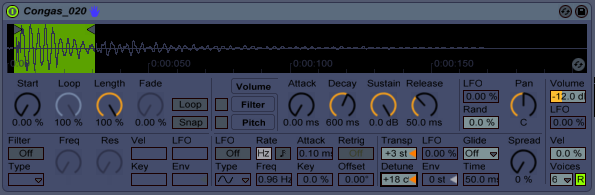
So, now we have a couple nice sounding attacky drum hits to add some dynamics to this repetitive sound. Now, please keep in mind, this is just a basic example. If you were to really take care of your drum loop, and use all one hits, separating them on a couple different tracks, and then use the following method...you can get beautiful changing sounds, or you could get a total sloppy mess. That is why I am showing you this in more of a TOOL fashion, because in this explanation, we are using it SO subtly, that, if applied right, should almost be unable to be noticed when listening to the WHOLE track.First thing we are going to want to do is turn on the LFO in the middle of the simpler -
Also make sure RETRIG is OFF because we dont want it to re-trigger the LFO every time or that would then become a predictable change and would still make the drum hits repetitive.Now, what we want to do, is use the pitch LFO (beside the transp) and change the rate (freq) a little bit to get a subtle changing of pitch.
For the purpose of understanding what is going on here, put the LFO up quite a bit and just start tapping your simpler (with midi controller or keyboard) and watch the pitch go up and down.
What we want to do is do that SO subtly, that it is working within the detune range of the sound, and just making it sound less boring.I ended up coming up with these very SMALL parameters for my rate (freq) and LFO -
Now, if this was done correctly, you should almost be UNABLE to notice the difference. But, over time...this can amount to a lot. Especially if you apply it to other corresponding rhythms. Sometimes, it may be nice to have one of the more dominant rhythm parts, something sitting in the lower frequencies...to be unchanged at all. So it holds everything together, and then use this method on the other smaller, less bassy percussion. This is just MY idea, and from my experience, how I like it to work. You can however apply pitch LFOs to everything, and if you mastered this idea...using multiple tracks to make your rhythmic percussion, you could in theory, recreate the unpredictable, yet kind of predictable sounds of any organic percussion instrument.Also, keep in mind, if you apply this technique (or any pitch LFO technique) to other sounds like synth stabs, pads, tech house bass etc etc etc, you get some fabulous results. Again, this was an example of thinking long term with your rhythm, but go wild with your pitch envelopes & LFOs. They can be really surprising.
Hope this helped! Keep makin tunes!!!
FroBot
Wednesday, March 24, 2010
Mapping VST Sound Presets to Knobs on your Controller
The first thing we want to do is make a new midi track and insert in a blank instrument rack. After that, we want to open the device chain window via the little button the the left of the instrument rack that looks like 3 lines. Now you have the device chain window open for dropping in instruments. Now, just drop in as many instruments (softsynths, ableton sounds, etc) as you like. In mine, I have 13 ZEBRA soft synths (but you can use different ones if you like) -
Remember to not go TOO crazy within a chain because it does take a lot of CPU load if you have 20 or 30 synths up. Once you have all the synths put in that you want, you need to click the other 2 icons on the left side of the instrument rack so you can see your macros and also your softsynth box. (like the picture above)Now, what we are going to be doing, is mapping the on/off buttons for each of the softsynths, to macro 1. To do this, follow these instructions -
1. Click the little map mode button above your macros. (everything will be green)
2. Click the on/off button of the 1st softsynth (to the left of the synth name)
3. Click MAP under Macro 1.
(Go to synth 2,3,4,etc... and repeat this process for all of your softsynths)
Now, what we have done is mapped the on and off to macro 1. (which we will later map to a knob on the controller)
Now, the key to this is changing the midi min/max of each of the on/off buttons so it works best with your controller.
Remember, with midi, you have 1 - 127 values on any given knob. I am using a microkontrol which happens to have tiny little CLICKS every time I move it. Its just how they made the controller...you can actually feel little clicks when you move the knob. Every click is one midi value UP or DOWN. So, in my example, my midi min/max are very close because I can feel 1 click, 2 clicks, etc. If you are using a really analog feeling knob, you may be better to make your mapping increments bigger. Mine is like this -
My min and max are only 1 apart, for easy clicking on the midi controller. You may be better off doing something like this -Min 1 Max 10
Min 11 Max 20
Min 21 Max 30
This is if your controller knob does not have the CLICKING feel that mine does. I happen to like the fact that it clicks, because I can easily tell how many midi values I am going up or down....so my min & max values are very low.
Now, you have a nice macro that will switch between all of your synths in that device chain. Last thing you need to do is go into your NORMAL mapping mode (top right of the ableton screen) and map that new macro to a knob on your controller like this -
Now, you can easily toggle between all of your synths in the device chain just by moving one knob on your controller. What is also nice about this, is that you can go into any one of those softsynths and change the sounds to what you are looking for, and if will automatically save them to that set as long as you click SAVE within your ableton set.Another nice thing, is that you can add effects (especially volume utility) to each individual chain to make sure each volume is exactly the same no matter which sound you switch too. This can be very important when playing live and switching through sounds in the middle of a jam. If you want your volumes to stay the same, either change the master volume within the softsynth, or, add a utility to the end of the chain. You can also add other effects to the chain if you would like that effect to always be on a certain row in your device chain. This can be nice if you make the SAME synth sound on a few of the devices, but have different effects on each so it sounds a little different throughout a certain jam. Very handy when you want to use a different effect than the ones you have mapped out to your controller already....and makes it easy to get rid of it when you are finished with it (just go to another synth in the chain that does not have it).
I really like this because it lets me switch through sounds that I have pre-made, and really like (just like save banks on a regular synth).
Anyway, thats it for mapping vst sound presets. Have fun improving!
Tuesday, March 23, 2010
Audio Dropouts When Changing Track View in Ableton 8 - Organizing Outputs
First, I will get to the a very possible solution to that problem, and then mention a few other things worth checking.
A simple fix for the audio dropouts while switching tracks can be by simply cleaning up your inputs and outputs. (this totally fixed my problem) When you start using other stand alone programs, midi pipe or other midi routing, and IAC Bus drivers, or Network Sessions, you can really start to confuse your ableton ports. You will start getting huge lists of ins, outs, & sync. Even if you have a great understanding of your ins & outs, it can sometimes can get confusing if not documented. One big recommendation is (assuming you understand ins, outs)...to one by one go through and clean up your ins and outs and make sure everything that CAN be OFF, is OFF. Leaving inputs and outputs activated...(that dont need to be on) seems to be one of the major factors in track view clipping. I dont know why, but as it jumps from one tracks ins and outs (within your view), to the another, there tends to be small audio dropouts (without being a large jump in CPU usage). So, go through and clean up your ins and outs, and then document them. I use my blog outlet to keep my notes daily, so here are mine from today.

Understanding Ports -
WITH MIDIPIPE on VCM
Synth -microKONTROL (Port A) - Track & Remote (this is the keys) - So audio FROM within a track comes from (PORT A)
Synth - microKONTROL (Port B) - Track & Remote (this is the knobs) - This must be on for knobs to work.
Outputs can be off totally for synth.
Launchpad Input/Output - Track/Remote (no sync)
IAC Driver (Monome Bus I Made) Output - Sync Only
Network Session - (Out SYNC on if master, IN sync if slave)
Midipipe Output - Track & Remote
Trigger Finger Input - Track & Remote
from nonome-launchpad-poly-osx1 Input - Track & Remote
VCM OUTPUT - Should turn this on when not using midi pipe. (Track & Remote)
I just took small notes of my ins and outs that I use with midipipe, and a few notes about when I would NOT be using it.
Even if a lot of this is common sense, its just nice to take notes because you always seem to find yourself in different set situations where you will be changing these for some reason, and its good to have something to look back on....(even a screenshot would be useful)
Now after I did this, my dropouts totally disappeared. I had a few things activated that shouldnt have been....but now it sounds great.
A few other things to take into consideration when dealing with dropouts is your buffer size, and the effects that are within a track.
With buffer size, its best to play around in multiples of 64, 128, 256, 512, 1024, etc. Its also good to restart your soundcard after changing the buffer size (and even restarting ableton as I have noticed live 8 will sometimes shut down after changing soundcard settings....mine being the FA-66, but I have also seen it with some other soundcards).
Another thing is, and I cant say this for sure (only hearing from other users), is that certain effects will make dropouts. I heard that live 8's new frequency shifter has been known to make dropouts. I have heard that having a compressor can sometimes do it. I dont know how true these are, but they are things to at least think about. Users on forums sometimes have an even better understanding of the program than the makers because they really get deep into small features within the program.
Also, goes without saying, but shut down other programs running when using live. This can help with CPU load, and is just generally a good idea.
Thats it on dropouts. Lets weed those little fuckers out of ableton. Any other ideas on this topic are greatly appreciated.
FroBot